MP4 to SRT Converter
Convert MP4 to SRT online from any vertical 9:16 clip or widescreen 16:9 video. Audio is stripped inside your browser so large H.264/HEVC recordings transcribe fast with zero black bars.
Drag & drop your video or audio
MP3, WAV, M4A, MP4, MOV, WebM, MKV · Up to 1 GB · Free up to 5 min, no sign-up
More ▾
How Our MP4 to SRT Converter Works in Three Steps
Select any 9:16 or 16:9 video file
Staged preview reads your exact video pixel dimensions (such as 1080×1920 vertical Reels or 4K YouTube exports) without uploading gigabytes of raw camera frames.
Local WebAudio strips a lightweight mono stream
Instead of pushing an 800 MB camera recording over Wi-Fi, OfflineAudioContext downsamples speech to a compact 16 kHz stream directly on your device for rapid MP4 to SRT recognition.
Download clean .SRT or burned captioned video
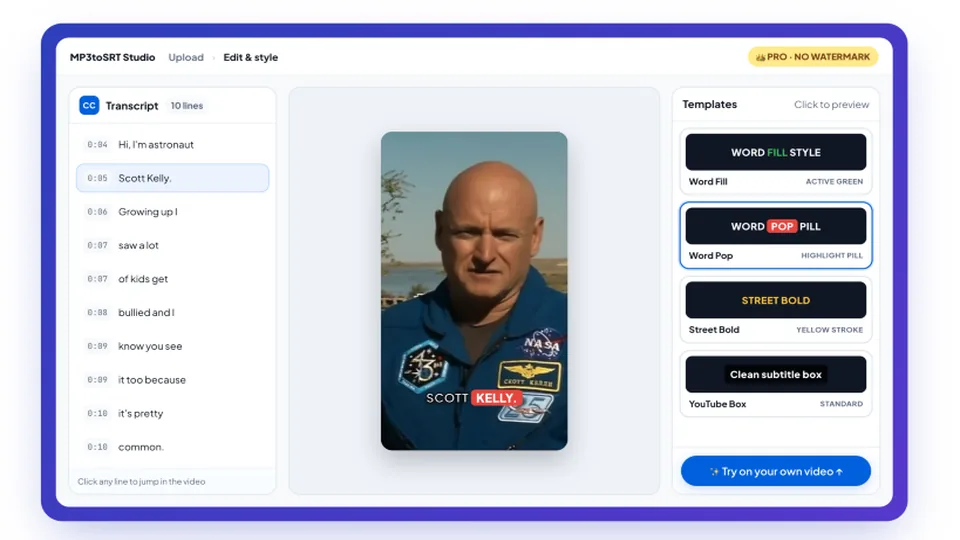
Proofread word-level timestamps in our 3-pane studio, then export sidecar SubRip (.srt), WebVTT, Final Cut FCPXML, or hard-burned video preserving your original aspect ratio.
MP4 to SRT Sidecar vs. Burned-In Video Captions
Choosing the right subtitle delivery format depends on whether your audience watches on YouTube, social feeds, or desktop NLE timelines.
Video Subtitle Output Comparison
| Delivery Format | Best Platform | Toggleable by Viewer | Keeps Custom Fonts & Word-Pop | File Size Impact |
|---|---|---|---|---|
| Sidecar .SRT file | YouTube Studio, Premiere Pro, DaVinci Resolve | Yes (CC button) | No — viewer player controls font | Tiny (~8 KB text file) |
| WebVTT (.vtt) | HTML5 <video>, Vimeo, Wistia, Teachable | Yes (browser track) | Basic CSS cue positioning only | Tiny (~9 KB text file) |
| Burned Captioned MP4 | TikTok, Instagram Reels, LinkedIn, X/Twitter | Always visible (hardsub) | Yes — exact Word Fill, Word Pop & Spotlight | Re-encoded at original resolution |
| Final Cut .FCPXML | Final Cut Pro, DaVinci Resolve timeline titles | Editable native titles | Editable inside your NLE inspector | Small XML timeline (~25 KB) |
Zero pillarbars on rotated smartphone footage
iPhone and Android vertical clips store rotation metadata flags that break older subtitle tools. Our pipeline normalizes SAR 1:1 and rotation flags so 9:16 stays crisp 9:16.
Fast turnaround on 1 GB+ screen recordings
Zoom replays, Loom tutorials, and OBS captures often top 500 MB. Local browser audio stripping cuts upload bytes by 95% before MP4 to SRT transcription begins.
Word-accurate millisecond alignment
Every spoken syllable carries exact start and end timestamps, powering active-word green fill, red pill highlights, and instant click-to-seek video review.
Dual-language YouTube & course tracks
Transcribe in the original spoken language first, then translate into Spanish, French, Japanese, or Mandarin—or stack both languages into one two-line bilingual SRT.
Keyboard-first cue splitting & merging
Press Enter inside any subtitle box to split long phrasing right at your cursor, or press Backspace at line start to join clauses without losing sync.
Zero permanent media retention
Browser-stripped audio chunks are processed purely to generate your timed subtitles and deleted immediately afterward—client footage never sits in cloud storage.
More audio, video and subtitle converters
Simple pricing, no forced subscription
Short files are free. Pay once when you need more.
- Files up to 5 minutes
- Full 3-pane editor & SRT export
- Word Fill & standard styles
- TXT / LRC / VTT converter
- Files up to 2 hours
- Captioned MP4 video burn-in
- Speaker labels & bilingual SRT
- Credits never expire
- Everything in Creator Pass
- Unlimited conversions
- Priority processing
- Cancel any time
Frequently asked questions
Why does this MP4 to SRT converter start faster than typical cloud uploaders?
Traditional caption websites upload your entire multi-hundred-megabyte video stream first. Here, WebAudio decodes only the dialogue channel inside your browser and uploads a fraction of the bytes.
Will exporting a burned captioned video add black bars to 9:16 footage?
Never. Both the live preview canvas and our video renderer read your exact display width, height, and rotation metadata, matching 540×960 or 1080×1920 pixel-for-pixel.
Can I convert recordings longer than 5 minutes?
Clips up to 5 minutes convert from MP4 to SRT free with no sign-up. Videos up to 2 hours are supported via automatic 12-minute sequential chunking with the $4.99 Creator Pass.
How do I upload the resulting .SRT file to YouTube Studio?
In YouTube Studio, select your video, open Subtitles on the left menu, click Add Language, choose Upload file with timing, and attach your downloaded .srt file.
Does this handle HEVC (H.265) and iPhone MOV videos?
Yes. Any MP4 or MOV whose audio stream decodes in your browser is extracted locally, with automatic server-side fallback for specialized camera codecs.
What is the difference between exporting .SRT and .ASS for video editing?
Plain .SRT carries universal timing and text for YouTube, Premiere, and Resolve. .ASS embeds dynamic PlayResX/PlayResY dimensions plus font scale and vertical margin coordinates.
Convert MP4 to SRT Online Free
Drop any 9:16 or 16:9 clip above—get clean .SRT files or burned video captions in seconds.